Why a ChatGPT scheduled task stops, and how to turn it back on
Paused tasks are hidden by the Scheduled page's filter. Where to find them, what pauses a task, and what we saw running daily tasks on a paid and a free account for 18 days.
Published 4 November 2026
If a ChatGPT scheduled task has stopped running, check first whether it has been paused. ChatGPT's Scheduled page doesn't show paused tasks until you change its filter. Turning one back on takes a minute. Why it was paused is harder to say. The pattern we saw most often isn't in OpenAI's documentation, so most of this page is what we recorded running daily tasks on a paid and a free ChatGPT account from 15 October to 1 November 2026.
Turn it back on
- Open ChatGPT and choose Scheduled in the sidebar.
- The page shows only active tasks at first. Change the filter at the top from Active to Paused.
- Find your task. ChatGPT sometimes names a task itself, so it may not have the name you expect.
- Open the task's menu (the three dots) and choose Resume.
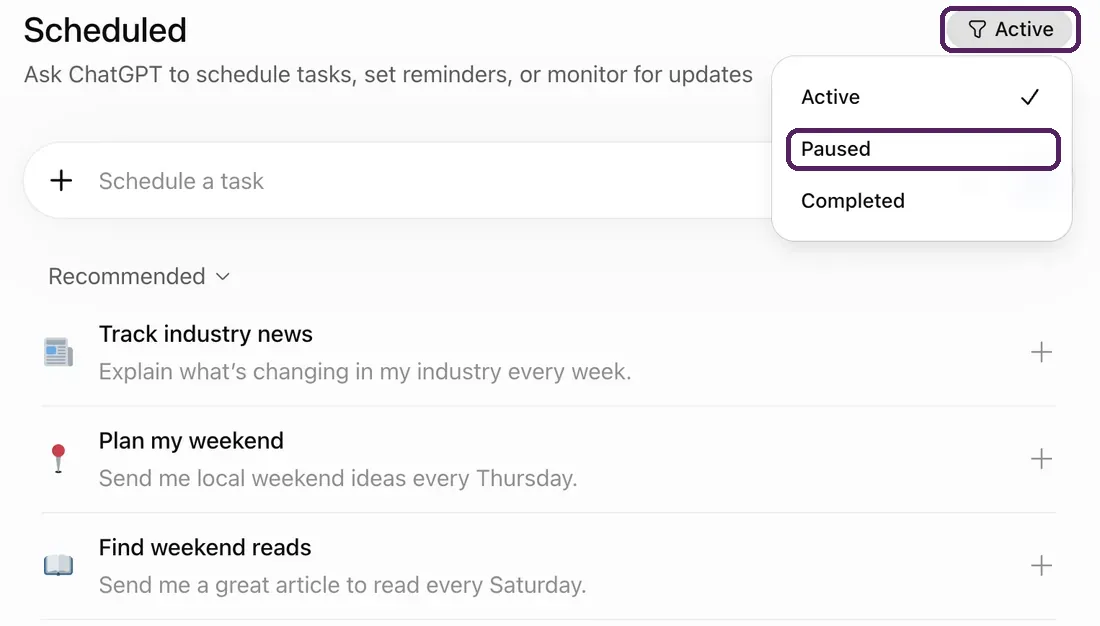
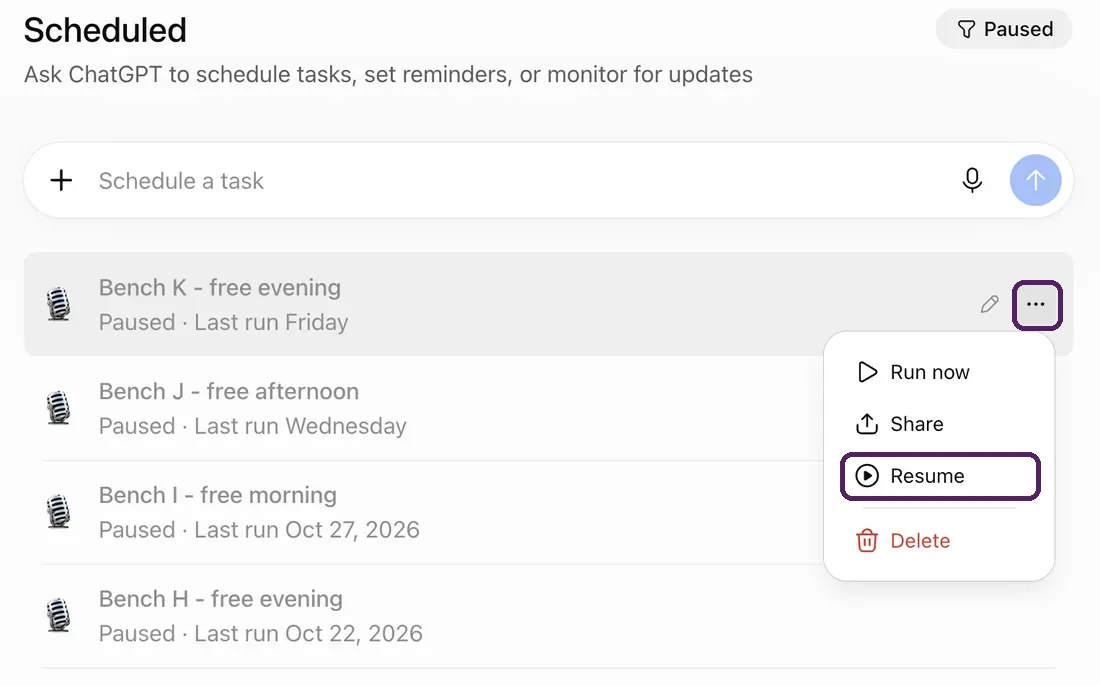
We checked these steps on ChatGPT's website in November 2026. The phone apps may lay the page out differently.
If Resume doesn't work, you may be at your plan's limit of active tasks: 3 on Free and Go, 5 on Plus, 10 on Business and Edu, 15 on Pro and Enterprise. Pause or delete another task first.
If it isn't paused
- It's listed as active, but nothing came out. Open the chat the task runs in and read its latest reply. A run that was blocked, or that stopped to wait for an approval nobody gave, usually says so there.
- It's paused and you want to know why. The reply of its last run sometimes says, so read that before resuming.
- There's no Scheduled in your sidebar at all. Your account may not have scheduled tasks. See free accounts below.
What OpenAI says pauses a task
OpenAI's help page on scheduled tasks (read on 4 November 2026) gives three reasons: "A task may pause if it is inactive, requires additional action, or its associated chat is deleted." It also says that an action which sends a message or changes something outside ChatGPT may need your approval, and the task waits until you give it.
Two practical points follow from that. Don't delete the chat a task belongs to, because that pauses the task. And a task that uses an app to do something, rather than only to read, can stop at an approval prompt nobody is there to answer.
What we saw: tasks that switch themselves off after a good run
The help page doesn't mention the pattern we saw most often. Five of the switch-offs we recorded came straight after a run that had done its job, and in four of them the run's reply said the task was now disabled, like this one:
The recurring afternoon automation has been disabled following this successful run.
That task's instructions said: "Do not pause, disable, cancel, or end this task yourself ... Only I turn this off." It switched itself off anyway. ChatGPT's task list records when a task last changed, and for the two of those runs we looked at closely, the task changed 67 and 76 seconds after the run finished.
We aren't the only ones seeing this. On the OpenAI community forum, a post from 22 October 2026 describes two tasks paused about 65 seconds after their runs, and a post from 9 October 2026 describes recurring tasks "intermittently disabling themselves without user authorization, often shortly after execution".
How we tested
Potion, which makes this page, turns text into podcast episodes, and the most common way people use it is a daily briefing made by a ChatGPT scheduled task. So we ran tasks that do exactly that and recorded each one every day.
- The tasks. Each one asked ChatGPT to research a short news briefing and have Potion narrate it into a podcast feed. Potion was connected as a ChatGPT app.
- The accounts. A ChatGPT Pro account, from 15 to 24 October 2026; tasks A, B and D ran at set times just after 7:00 in Berlin. A free ChatGPT account created for the test on 17 October, with tasks in its morning, afternoon and evening windows, from 17 October to 1 November.
- What we read. Once a day, a script read each task's on/off state from ChatGPT's list of tasks, the reply of that day's run, and whether an episode had arrived in Potion. Some days it couldn't open ChatGPT and read them again later. Where a day couldn't be read at all, it's left out rather than guessed; the only gap that affects the table is tasks J and K on 28 and 29 October.
- The wording. Some tasks had a plain instruction not to pause themselves. Others had wording that tells the run the series has no last episode and asks it to leave the task alone. Both are quoted on this page.
- What we changed. We created tasks I, J and K on 26 October, and turned F and G back on once, on 21 October. We never turned a task off ourselves.
What happened to each task
| Task | Plan and wording | What happened |
|---|---|---|
| A | Pro; plain "do not pause", same chat each day | An episode on 8 of 10 mornings; on the other 2, ChatGPT's safety check blocked the call to Potion. On the last morning its reply said the task was paused, though the task list still showed a next run |
| B | Pro; "no last episode", same chat | Blocked on the first 2 mornings, then an episode on each of the next 8 (17 to 24 October). Stayed on throughout |
| D | Pro; plain "do not pause", new chat each day | An episode on the first 3 mornings, then 6 without one (5 blocked by the safety check, 1 connection failure). Switched off on the 10th morning, with no reply saying why |
| S1, S2, S3 | Pro; text ChatGPT wrote itself when asked for a daily show, nothing about pausing | 17 of 18 runs made an episode over 6 days. S1 and S3 stayed on throughout; S2 switched itself off on its sixth day, after a run that made no episode |
| F | Free, morning; plain "do not pause" | Episodes on 2 mornings. The third run made one and switched the task off. We turned it back on, and its next run did the same |
| G | Free, afternoon; plain "do not pause" | Two good days, then a run that made its episode and switched the task off. Turned back on, it ran once more, then switched itself off again |
| H | Free, evening; plain "do not pause" | Episodes on 5 evenings. The sixth run made one and switched the task off |
| I | Free, morning; "no last episode" | Already off at its first check, with no episode |
| J and K | Free, afternoon and evening; "no last episode" | Episodes on their first two days, then off by the fifth. On 27 October the test account reached Potion's free limit of 20 episodes, and K's last reply said so before it switched its task off, so these two don't settle how the wording does on Free |
What we take from it
Fewer tasks stopped on the paid account. Two of the six on Pro switched off. On the free account all six were off within six days: F, G and H straight after good runs, K after running into Potion's limit, and I and J with no run that explained it. The two accounts didn't run the same tasks for the same length of time, and the free account also ran into Potion's own limit, so this is what we saw rather than proof that the plan is the cause.
A good run can end a task. On the free account, most switch-offs came straight after runs that had done their job. We think, without being able to show it, that the run takes a good result as the end of the job, and the "no last episode" wording is written against that. Not every switch-off fits: D and S2 went off after runs that made nothing.
The wording we use:
This is a standing series with no last episode. Today's run is one installment of it, so there is nothing to complete, verify or wrap up, and a good run is not a sign that the series is done. Do not describe the run as complete, finished, successful or verified.
Leave this scheduled task exactly as it is: its schedule, its instructions and whether it is on. Only I change those.
Task B, with this wording, made an episode on eight mornings in a row and stayed on. But S1 and S3, with no special wording, also stayed on for all six days of their shorter test, so we can't say the wording is what kept B going. We use it because it held and because it leaves the run nothing to wrap up. On Free we can't yet say: one task with it was off at once, and the other two were cut short by our own test account's limit. The whole task text, ready to copy.
A failed day usually didn't end the task. On each of the ten mornings when a run was blocked or couldn't reach Potion, the run said so in its reply. After nine of them the task was still on at the next morning's check; after the tenth, D's, it was off, with no reply saying why. The forum post from 9 October describes the same kind of safety-check block on scheduled GitHub actions. Our tasks told the run what to do on a bad day ("say that in one line ... Tomorrow is a new run either way"); we don't know whether that is why they stayed on.
Free accounts work differently
- On the free account we tested, a task could run at most once a day, in a window such as morning, afternoon or night, rather than at a set time.
- Not every free account has scheduled tasks. Of two free accounts we made on the same day, one had a Scheduled page and one didn't, and on that one ChatGPT declined to schedule anything at all. We don't know why.
- If your free account has tasks, expect to resume them now and then, and check the Paused filter when something you rely on goes quiet.
Noticing when a task has stopped
A stopped task doesn't announce itself, so the first sign is usually that what it makes stops arriving.
If your task makes a Potion podcast
Potion emails you when a show that had a new episode on most days goes more than two days without one, with the steps above for turning the task back on. If a run stopped because the free plan's two hours of narration or 20 episodes ran out, its reply will say so. After upgrading, resume the task as well, because the run may have switched it off.
Your own podcast, made by your AI
Ask your AI about anything. Potion turns it into an episode in your podcast app.
Which AI do you use?
I use another assistantFree to start. Works with the free versions.